CapCut
Create Stunning Videos with CapCut and Make Every Video Look Better — Simple, Fast & Creative.
CapCut
CapCut is a video editing app made for simple content creation. It lets users cut, join, arrange, and improve video clips. Many people use it for short videos and social posts. You can also add text, music, stickers, filters, and transitions. The app includes simple tools for beginners and more editing options. Through these tools, users can change videos without using another editor. CapCut also provides ready-made templates for quick editing. These templates can save time when making regular content. The app is available across mobile, desktop, and web platforms. Some features can vary by device, region, or account.
The CapCut APK can be useful for Android users looking for mobile editing. Users can install the app and start a project from their device. The CapCut App also includes features like auto captions, keyframes, background removal, and slow motion. Music and sound effects can be added inside projects too. Users can export videos using different resolution and frame rate settings. CapCut Download options are available through official app stores and its website. The CapCut Latest Version may also include newer tools and changes. Because features can change, the available options are not always the same. Still, the app keeps the editing process fairly easy for many users.
CapCut App Information
| App Detail | Information |
| App Name | CapCut |
| Version | Latest version varies by release |
| Developer | Bytedance Pte. Ltd. |
| File Size | Varies by version and device |
| Android Requirement | Varies by current release |
| Category | Video Players & Editors |
| Last Updated | Today |
The Google Play listing currently identifies the developer as Bytedance Pte. Ltd. and shows the app under video players and editors. It also lists the latest store update as September 11, 2026.
What is the CapCut App?
CapCut is an all-in-one video editing application for mobile users. It is mainly used to create and edit video content. Users can start with a blank project or use a ready template. After adding clips, they can cut and arrange them on the timeline. Text, music, filters, stickers, and effects can be added as needed. The app also has tools for changing video speed and adding transitions. More advanced options include keyframe animation and chroma key. There are also tools for stabilization and smooth slow-motion editing. This gives users more control without making the basic editing process too difficult.
The CapCut App is used by different types of content creators. Some users make short social media clips with it. Others use it for tutorials, product videos, reels, and simple personal projects. Auto captions can turn spoken words into subtitles inside a video. Text-to-speech can also create voice audio from written text. Background removal is another tool available in the application. CapCut also has templates, effects, music, and other creative assets. Some AI tools and features may not appear everywhere. Their availability can depend on the version, account, or region.
How to Download, Install, and use CapCut?
- Open the official app store on your Android device.
- Search for CapCut using the search box.
- Check that the developer shows as Bytedance Pte. Ltd.
- Open the CapCut app listing on the store.
- Tap the install button to begin the installation.
- Wait until the app finishes downloading to your device.
- Open CapCut after the installation has finished.
- Allow the required permissions when they appear.
- Choose New Project to start editing a video.
- Select videos or photos from your device.
- Add text, music, effects, filters, or transitions.
- Preview the project and export the finished video.
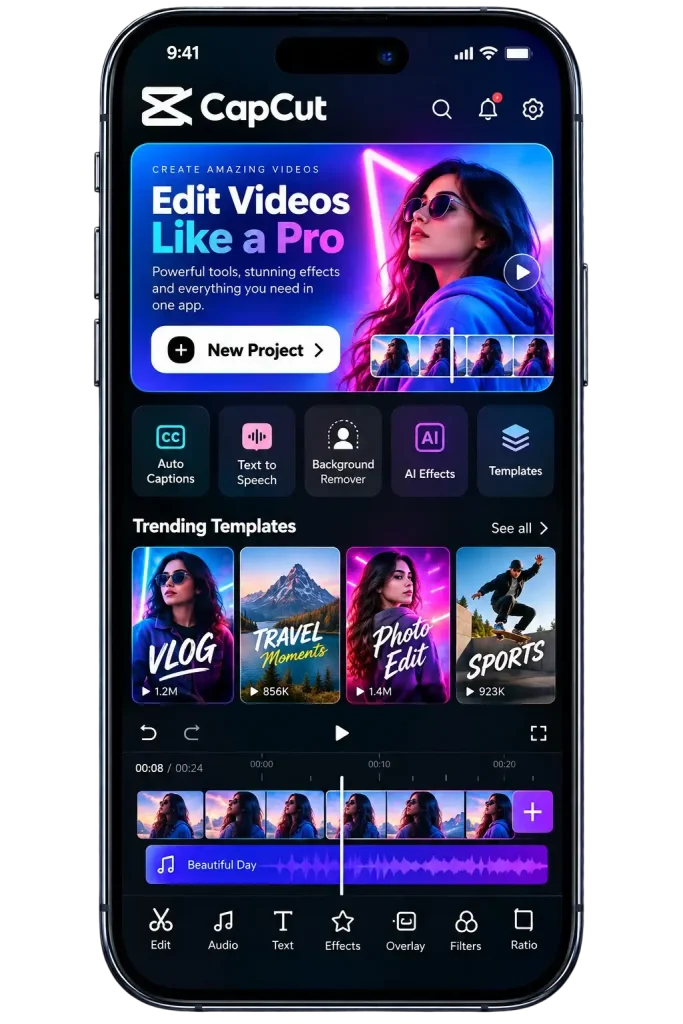
CapCut’s basic workflow starts with importing media into a project. Users can then edit clips, choose templates, add effects, and export the result.
Features of CapCut
Features of CapCut
CapCut includes simple and useful tools for creating and editing videos. Users can work with clips, text, music, effects, captions, and many other editing options in one place.
Simple Video Editing
CapCut provides basic tools for cutting and changing video clips. Users can trim unwanted parts from their videos. Clips can also be split, joined, or arranged in another order. This makes basic editing easy for new users. The timeline helps users see the project while working on it.
Ready-Made Templates
CapCut includes many templates for different types of content. Users can choose a template and add their own clips. The template already provides a basic visual structure. This can reduce the time needed for simple video projects. Template availability can change with updates and regions.
Auto Captions
The app can create captions from spoken words in a video. Users can select a language and generate subtitles automatically. The generated text can then be checked and changed manually. This is useful for videos where people are speaking on camera. Some advanced caption options can vary between platforms.
Keyframe Animation
Keyframes allow users to control movement inside a video. They can change positions, size, opacity, and other settings over time. This can make text, images, and clips move in a planned way. Users can create simple motion effects without another editing application. The feature gives more control over how elements move.
Speed Control
CapCut lets users change the speed of video clips. A clip can be slowed down for a slow-motion effect. It can also be made faster when a shorter section is needed. Speed curves provide more control over speed changes. This can make some edits look more smooth and varied.
Smooth Slow Motion
The app includes tools for creating slow-motion video effects. Optical flow can help create smoother results when slowing clips. Users can combine this with speed controls and speed curves. This is useful for action clips, sports footage, and other moving scenes. Results can still depend on the original video quality.
Chroma Key
Chroma key is available for removing a selected color from video. It is commonly used with green-screen style recordings. Users can replace the removed area with another video or image. This gives more choices when creating different backgrounds. The result can depend on lighting and the quality of the original recording.
Background Removal
CapCut can automatically remove backgrounds from suitable images or videos. This means users do not always need to remove the background manually. The feature can help when placing a person over another scene. It can also be used with other effects and editing tools. Availability and exact options can change between versions.
Text and Font Tools
Users can place text directly over their video clips. Different fonts, styles, and text templates are available inside the app. Text can be moved and adjusted according to the project. Users can also add subtitles as separate timeline elements. This helps with titles, explanations, labels, and short messages.
Filters and Effects
CapCut provides filters and visual effects for changing video appearance. Users can adjust the look of clips without editing every part manually. Effects can also be placed between clips or over selected sections. The app includes different styles such as blur, glitch, and 3D effects. New effects and trends can appear through app updates.
Music and Sound Effects
Users can add music and sound effects to their projects. Audio can be placed under video clips on the timeline. The app also supports extracting audio from videos for editing. Sound can be adjusted to fit the timing of different scenes. This gives users more control over the audio part of a video.
Text-to-Speech
Text-to-speech can turn written words into spoken audio. Users can enter text and select from available voice options. The generated voice can then be used in a video project. This can be useful when users do not want to record their own voice. Available languages and voices can vary between versions and regions.
Video Stabilization
The stabilization tool can help reduce unwanted movement in video footage. This can be useful when a video was recorded with shaky hands. Users can apply the option while editing suitable clips. It gives users another way to improve the viewing experience. The final result can depend on how much movement exists in the original clip.
Export Controls
CapCut provides different options when exporting finished videos. Users can select settings such as resolution and frame rate. The current app listing also mentions support for high-resolution exports. These controls let users prepare videos for different platforms and uses. Exact export choices may depend on the device and current app version.
AI Editing Tools
CapCut includes several AI-based tools for content creation. These include options such as auto captions and background removal. Its current tools also include AI video and image creation features. Some AI features are available only in certain regions or products. Users may therefore see different tools on different devices.
Pros and Cons
Pros
- Simple interface for basic video editing
- Many useful editing tools
- Ready-made templates for quick projects
- Text and caption tools are available
- Music and sound effects can be added
- Supports different video export settings
- Background removal is available
- Keyframe editing gives more control
- Speed controls work for different clips
- Works for short and longer video projects
- Available on multiple platforms
- Useful tools for beginners and regular users
Cons
- Some features may require payment
- Certain tools can vary by region
- AI features may not be available everywhere
- Large projects can use more storage
- Some advanced tools need more learning
- Export options can vary between devices
CapCut vs InShot
Many users compare CapCut with other video editors. InShot is another well-known editing application. Both apps are made for creating and changing videos. They provide basic trimming, music, text, effects, and other tools. CapCut has a larger selection of editing features in some areas. InShot keeps many of its tools simple and easy to find. The available features can also change after updates. So, the two apps can feel different during normal editing work.
| Feature | CapCut | InShot |
| Video Trimming | Yes | Yes |
| Text Tools | Yes | Yes |
| Music Tools | Yes | Yes |
| Templates | Available | Available |
| Keyframes | Yes | Limited |
| Auto Captions | Available | Available |
| Background Removal | Available | Available |
| Speed Controls | Yes | Yes |
| AI Tools | Available | Limited |
| Multiple Platforms | Yes | Mainly Mobile |
CapCut provides many editing controls inside one application. Users can work with timelines, text, music, effects, transitions, and speed settings. It also has tools such as keyframes and background removal. Some users may also see AI tools in their version. The exact options can depend on the current release. This means the editing screen may not look exactly the same for everyone.
InShot also provides tools for regular video editing. Users can trim clips, add music, place text, and change video settings. It is mainly known as a mobile editing application. Its interface keeps many common tools easy to reach. CapCut has more tools in some editing areas, while InShot keeps things more focused. Both applications receive updates and can change their features over time.
Alternatives
Some users look for other editing apps for different reasons. They may want another interface or different editing tools. Some also use more than one editor for separate projects. There are several real applications that work for similar video tasks. The following apps are commonly used for mobile and simple video editing.
InShot
InShot is a mobile video and photo editing application. It lets users trim clips, add music, and place text. Users can also add stickers, filters, transitions, and effects. The app supports different canvas sizes for social media content. Its editing layout is fairly simple for regular projects. InShot is useful for users who mainly edit videos on phones. It also includes photo editing tools, which makes it useful for mixed content work.
VN Video Editor
VN Video Editor is another application for video editing. It provides a timeline where users can arrange different clips. The app includes text, music, transitions, filters, and speed controls. It also provides keyframe tools for more controlled movement. Users can create simple clips or more detailed projects. VN is available for mobile devices and other platforms. Its tools can be used for social videos, tutorials, and other regular content.
KineMaster
KineMaster is a video editing application designed for mobile devices. It provides a multi-layer editing system for different types of projects. Users can add video, images, text, music, and effects together. It also provides tools for trimming and adjusting individual clips. Some features and assets can depend on the user’s plan. KineMaster is used for social videos, tutorials, presentations, and other content. Its interface gives users more editing controls in one place.
Adobe Premiere Rush
Adobe Premiere Rush is made for creating and editing videos across supported devices. It provides basic editing tools for clips, audio, text, and transitions. Users can arrange media on a timeline and make changes before exporting. The application is connected with Adobe’s wider creative tools. This can be useful for people already using Adobe products. Premiere Rush has a different workflow from CapCut and focuses on simple video production.
FAQs
Conclusion
CapCut is used by many people for everyday video editing. The app puts many common tools in one place. Users can trim clips, add music, place text, and use effects. There are also templates for people who want a quicker editing process. Other tools can help with captions, backgrounds, speed, and animation. The application can be used for different types of short content. It is also available across several supported platforms. Some users may use only the basic tools, while others may use more advanced options. The editing process can start with a simple project and become more detailed later. This makes the application useful for different kinds of editing work without needing many separate applications.
The CapCut App also receives changes through regular updates. New tools, templates, effects, and other options can appear over time. Some features may not be available for every user. Region, device, account type, and platform can affect what appears inside the application. Users can also find different editing options based on the current release. The CapCut Latest Version may therefore look different from an older release. For Android users, the CapCut APK is another term often used when discussing the Android application package. Users should check the source before installing any APK file. The official application is generally available through supported stores and platforms. There are many tools inside it, and some are quite simple to use.